Part 4 of 5 · Lab Guide
EIGRP Module D · Enterprise Routing Master Series
Hands-On Lab: Summarization, Stub Routing & Route Filtering
Five progressive lab tasks on a production-grade 7-device topology with a real OSPF redistribution domain. Import the included .unl files into EVE-NG and complete the tasks to master summarization with Null0 protection, stub routing query confinement, prefix-list filtering, and authentic redistribution with route tagging.
Lab Topology (3-Pillar Standard)
Visual diagram, device inventory table, and traffic legend
How to Read This Topology
The topology is documented using the Pause4Tech 3-Pillar Standard: (1) Topology diagram for visual reference, (2) device inventory table for addressing, and (3) traffic legend explaining protocol flows. This module's topology includes a real OSPF domain for authentic redistribution labs.
Pillar 1 — Topology Diagram
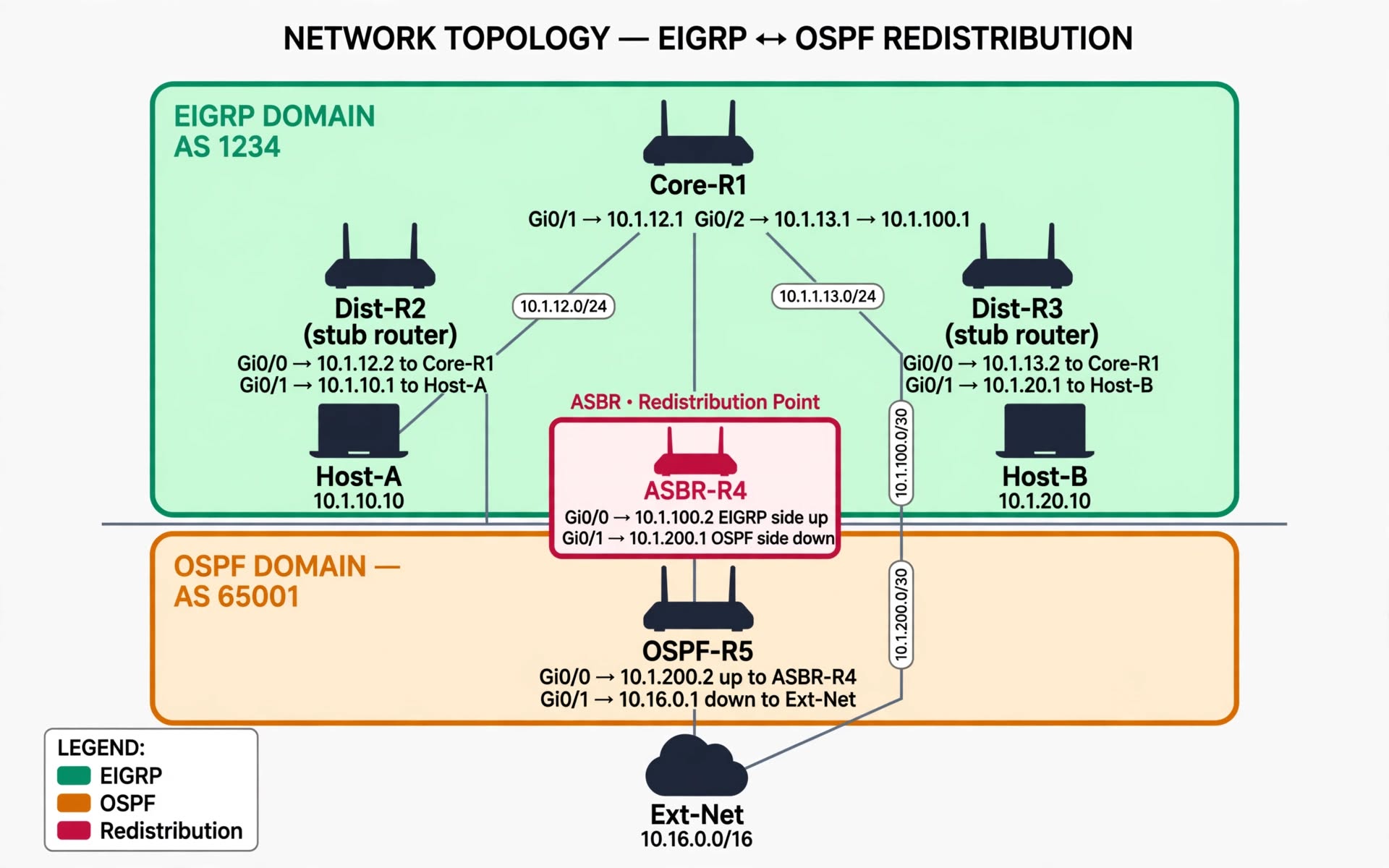
Figure 1 — EIGRP Module D Lab Topology: EIGRP AS 1234 domain (emerald) redistributing into OSPF AS 65001 domain (amber) via ASBR-R4 (rose).
Show ASCII Fallback (for terminal users)
+-----------------------------------------------------------+
| EIGRP DOMAIN - AS 1234 (emerald) |
| |
| [Core-R1] |
| Gi0/1 -> 10.1.12.1 |
| Gi0/2 -> 10.1.13.1 |
| Gi0/3 -> 10.1.100.1 |
| / | \ |
| (10.1.12.0/24) (10.1.100.0/30) (10.1.13.0/24) |
| / | \ |
| [Dist-R2] [ASBR-R4] [Dist-R3] |
| (stub) (redistribution) (stub) |
| Gi0/1->10.1.10.1 Gi0/0->10.1.100.2 Gi0/1->10.1.20.1 |
| | | |
| [Host-A] [Host-B] |
| 10.1.10.10 10.1.20.10 |
+-----------------------------------------------------------+
|
(10.1.200.0/30)
|
+-----------------------------------------------------------+
| OSPF DOMAIN - AS 65001 (amber) |
| [OSPF-R5] |
| Gi0/0 -> 10.1.200.2 |
| Gi0/1 -> 10.16.0.1 |
| | |
| [Ext-Net] |
| 10.16.0.0/16 |
+-----------------------------------------------------------+
Pillar 2 — Device Inventory Table
| Device | Role | Interfaces | IP Addresses | Protocol | Router ID |
|---|---|---|---|---|---|
| Core-R1 | EIGRP Hub | Gi0/1 (to R2) Gi0/2 (to R3) Gi0/3 (to R4) Lo0 |
10.1.12.1/24 10.1.13.1/24 10.1.100.1/30 1.1.1.1/32 |
EIGRP AS 1234 | 1.1.1.1 |
| Dist-R2 | Stub Router | Gi0/0 (to R1) Gi0/1 (to Host-A) Lo0 |
10.1.12.2/24 10.1.10.1/24 2.2.2.2/32 |
EIGRP AS 1234 | 2.2.2.2 |
| Dist-R3 | Stub Router | Gi0/0 (to R1) Gi0/1 (to Host-B) Lo0 |
10.1.13.2/24 10.1.20.1/24 3.3.3.3/32 |
EIGRP AS 1234 | 3.3.3.3 |
| ASBR-R4 | ASBR / Redistribution | Gi0/0 (to R1) Gi0/1 (to R5) Lo0 |
10.1.100.2/30 10.1.200.1/30 4.4.4.4/32 |
EIGRP + OSPF | 4.4.4.4 |
| OSPF-R5 | External Router | Gi0/0 (to R4) Gi0/1 (to Ext-Net) Lo0 |
10.1.200.2/30 10.16.0.1/16 5.5.5.5/32 |
OSPF AS 65001 | 5.5.5.5 |
| Host-A | End Device | Gi0/0 | 10.1.10.10/24 (GW .1) | N/A | N/A |
| Host-B | End Device | Gi0/0 | 10.1.20.10/24 (GW .1) | N/A | N/A |
Pillar 3 — Traffic Flow & Protocol Legend
| Symbol | Meaning |
|---|---|
| Emerald Region | EIGRP AS 1234 domain |
| Amber Region | OSPF AS 65001 domain |
| Rose Highlight | Redistribution point (ASBR-R4) |
| Green Arrows | EIGRP Hello packets (multicast 224.0.0.10) |
| Blue Arrows | OSPF Hello packets (multicast 224.0.0.5 / 224.0.0.6) |
| Red Dashed | Redistribution boundary (route exchange between domains) |
| Purple Dashed | Stub query confinement zone |
Lab Tasks (5 Progressive Scenarios)
Step-by-step configuration with verification checkpoints
1
Route Summarization with Null0 Protection
Objective: Configure route summarization on Core-R1 to advertise a single aggregate route for the 10.1.0.0/16 range to both Dist-R2 and Dist-R3. Verify that Null0 discard protection is installed with AD 5.
Why This Matters in Production: Summarization reduces routing table size and hides flapping subnets. The Null0 route protects against loops when unassigned subnets within the summary range are queried.
Step 1 — Verify baseline subnets
Core-R1# show ip route eigrp
! Look for individual /24 subnets from Dist-R2 and Dist-R3
! 10.1.10.0/24 from Dist-R2
! 10.1.20.0/24 from Dist-R3
Step 2 — Configure summarization on both uplinks
Core-R1# configure terminal
Core-R1(config)# interface GigabitEthernet0/1
Core-R1(config-if)# ip summary-address eigrp 1234 10.1.0.0 255.255.0.0
Core-R1(config-if)# exit

Core-R1(config)# interface GigabitEthernet0/2
Core-R1(config-if)# ip summary-address eigrp 1234 10.1.0.0 255.255.0.0
Core-R1(config-if)# exit
Step 3 — Verify Null0 route is installed
Core-R1# show ip route | include Null0
Core-R1# show ip route | include summary

! Confirm the summary is a Null0 discard route with AD 5
Expected Output
Core-R1# show ip route | include Null0
D 10.1.0.0/16 is a summary, 00:00:15, Null0

! Summary route 10.1.0.0/16 installed with Null0 next-hop
! AD of this route is 5 (visible with 'show ip route 10.1.0.0')
2
Stub Routing & Query Confinement
Objective: Configure Dist-R2 and Dist-R3 as EIGRP stub routers. Verify stub routing is active and that ASBR-R4 remains a transit router (non-stub) for contrast.
Why This Matters in Production: Stub routing prevents edge routers from forwarding queries into a growing query domain. This eliminates SIA events that cascade from the core to the edge. The contrast with ASBR-R4 (transit) demonstrates when NOT to use stub.
Step 1 — Configure stub on Dist-R2
Dist-R2# configure terminal
Dist-R2(config)# router eigrp 1234
Dist-R2(config-router)# eigrp stub connected summary
Dist-R2(config-router)# end

! Verify
Dist-R2# show ip protocols | section Stub
Step 2 — Configure stub on Dist-R3
Dist-R3# configure terminal
Dist-R3(config)# router eigrp 1234
Dist-R3(config-router)# eigrp stub connected summary
Dist-R3(config-router)# end

! Verify
Dist-R3# show ip protocols | section Stub
Step 3 — Verify on Core-R1 and contrast with ASBR-R4
Core-R1# show ip eigrp neighbors detail
! Look for "Stub Peer" on Dist-R2 and Dist-R3
! ASBR-R4 should NOT show "Stub Peer"

Core-R1# show ip route eigrp
! Ensure all expected routes are still reachable
Expected Output
Dist-R2# show ip protocols | section Stub
EIGRP stub, receive-only
  Connected
  Summary

! Stub is active with connected + summary options

Core-R1# show ip eigrp neighbors detail | include Stub|Address
! Dist-R2 and Dist-R3 → "Stub Peer"
! ASBR-R4 → no Stub annotation (transit router)
3
Route Filtering with Prefix-Lists
Objective: Create a prefix-list to filter a specific route from being accepted from Dist-R3. Verify that the filtered route does not appear in the topology table while other routes remain unaffected.
Why This Matters in Production: Route filtering enforces security boundaries and prevents route leaks. Prefix-lists are the modern, structured way to filter routes — but a typo can silently filter essential routes.
Step 1 — Baseline before filtering
Core-R1# show ip route eigrp
! Note the current routes: 10.1.10.0/24 and 10.1.20.0/24
! We will filter out 10.1.20.0/24 from Dist-R3
Step 2 — Create the prefix-list
Core-R1# configure terminal
Core-R1(config)# ip prefix-list FILTER_DISTR3 deny 10.1.20.0/24
Core-R1(config)# ip prefix-list FILTER_DISTR3 permit 0.0.0.0/0 le 32
Core-R1(config)# exit

! Verify the prefix-list
Core-R1# show ip prefix-list FILTER_DISTR3
Step 3 — Apply the filter inbound on the interface
Core-R1# configure terminal
Core-R1(config)# router eigrp 1234
Core-R1(config-router)# distribute-list prefix FILTER_DISTR3 in GigabitEthernet0/2
Core-R1(config-router)# end
Step 4 — Verify the filter is working
Core-R1# show ip route eigrp
! 10.1.20.0/24 should be absent
! 10.1.10.0/24 should still be present

Core-R1# show ip eigrp topology | include 10.1.20
! Should return empty (filtered)

! Check the filter is applied
Core-R1# show ip protocols | include filter
Expected Output
Core-R1# show ip route eigrp
D 10.1.10.0/24 [90/158720] via 10.1.12.2, 00:15:23, Gi0/1

! 10.1.20.0/24 is now absent — filter is working
! 10.1.10.0/24 remains — filter is precise

Core-R1# show ip protocols | section filter
  Incoming update filter list for GigabitEthernet0/2 is FILTER_DISTR3
4
Redistribution with Route Tagging (Authentic OSPF)
Objective: Configure two-way redistribution between EIGRP AS 1234 and OSPF AS 65001 on ASBR-R4. Use route tags, explicit metrics, and prefix-list filtering to prevent loops. This is a real, authentic redistribution lab with a live OSPF domain.
Why This Matters in Production: Redistribution without tags can cause loops when routes are redistributed back into their original protocol. Tags enable loop detection and provide visibility into route origin. This lab simulates real inter-domain routing.
Step 1 — Verify current state on ASBR-R4
ASBR-R4# show ip route
! Confirm EIGRP routes are present and OSPF is running
ASBR-R4# show ip ospf neighbor
ASBR-R4# show ip eigrp neighbors
Step 2 — Create prefix-lists on ASBR-R4
ASBR-R4# configure terminal
ASBR-R4(config)# ip prefix-list REDIST_OSPF permit 10.16.0.0/16
ASBR-R4(config)# ip prefix-list REDIST_OSPF deny 0.0.0.0/0 le 32

ASBR-R4(config)# ip prefix-list REDIST_EIGRP permit 10.1.0.0/16 le 24
ASBR-R4(config)# ip prefix-list REDIST_EIGRP deny 0.0.0.0/0 le 32
ASBR-R4(config)# exit
Step 3 — Create route-maps with tags and metrics
ASBR-R4# configure terminal
! Route-map for OSPF → EIGRP (tag OSPF routes with 100)
ASBR-R4(config)# route-map OSPF_TO_EIGRP permit 10
ASBR-R4(config-route-map)# match ip address prefix-list REDIST_OSPF
ASBR-R4(config-route-map)# set tag 100
ASBR-R4(config-route-map)# set metric 100000 100 255 1 1500
ASBR-R4(config-route-map)# exit

! Route-map for EIGRP → OSPF (deny routes already tagged 100, tag others with 200)
ASBR-R4(config)# route-map EIGRP_TO_OSPF deny 5
ASBR-R4(config-route-map)# match tag 100
ASBR-R4(config-route-map)# exit

ASBR-R4(config)# route-map EIGRP_TO_OSPF permit 10
ASBR-R4(config-route-map)# match ip address prefix-list REDIST_EIGRP
ASBR-R4(config-route-map)# set tag 200
ASBR-R4(config-route-map)# exit
Step 4 — Apply redistribution on both protocols
ASBR-R4(config)# router eigrp 1234
ASBR-R4(config-router)# redistribute ospf 1 route-map OSPF_TO_EIGRP
ASBR-R4(config-router)# exit

ASBR-R4(config)# router ospf 1
ASBR-R4(config-router)# redistribute eigrp 1234 subnets route-map EIGRP_TO_OSPF
ASBR-R4(config-router)# end
Step 5 — Verify redistribution and tags
ASBR-R4# show ip route eigrp | include EX
ASBR-R4# show ip route 10.16.0.0 detail | include Tag

ASBR-R4# show ip route ospf
ASBR-R4# show ip route 10.1.10.0 detail | include Tag

! Verify on OSPF-R5 that EIGRP routes were redistributed
OSPF-R5# show ip route ospf | include 10.1

! Verify on Core-R1 that OSPF routes were redistributed
Core-R1# show ip route eigrp | include EX
Expected Output
ASBR-R4# show ip route eigrp | include EX
D EX  10.16.0.0/16 [170/30720] via 10.1.200.2, 00:01:15, Gi0/1

! AD 170 = external EIGRP (redistributed from OSPF)
! Route tag 100 attached

ASBR-R4# show ip route 10.16.0.0 detail | include Tag
  Tag 100, type external

OSPF-R5# show ip route ospf | include 10.1
O E2  10.1.10.0/24 [110/20] via 10.1.200.1, 00:01:15, Gi0/0
O E2  10.1.20.0/24 [110/20] via 10.1.200.1, 00:01:15, Gi0/0

! EIGRP routes appear as OSPF External Type 2 on OSPF-R5
! Route tag 200 attached

Core-R1# show ip route eigrp | include EX
D EX  10.16.0.0/16 [170/30720] via 10.1.100.2, 00:02:15, Gi0/3

! Core-R1 learns the external route via ASBR-R4
5
Multi-Feature Integration Challenge (Expert)
Objective: A production network requires simultaneous configuration of summarization, stub routing, route filtering, and two-way redistribution — with all four features working together without conflict. Diagnose any interaction issues and verify end-to-end connectivity from Host-A to Ext-Net (10.16.0.0/16).
Why This Matters in Production: Real enterprise networks combine all these features. This challenge simulates a real design review where features interact in unexpected ways. This is CCIE-lab-grade content.
Scenario Setup
Apply all four features on the appropriate routers. In production, these features interact and can cause conflicts:
- Summarization on Core-R1 might conflict with filtered subnets
- Stub on Dist-R2/3 might prevent redistributed routes from being propagated
- Route tags might conflict with prefix-list filtering
- ASBR-R4 must remain transit (not stub) to redistribute properly
Step 1 — Verify all features are active
! On Core-R1: Summarization + Filtering
Core-R1# show ip route | include Null0
Core-R1# show ip protocols | include filter

! On Dist-R2 and Dist-R3: Stub
Dist-R2# show ip protocols | section Stub
Dist-R3# show ip protocols | section Stub

! On ASBR-R4: Redistribution
ASBR-R4# show ip route eigrp | include EX
ASBR-R4# show ip route ospf | include E2
Step 2 — End-to-end connectivity test
! From Host-A, test connectivity to:
Host-A# ping 10.1.20.10
! Host-A to Host-B across the EIGRP domain

Host-A# ping 10.16.0.1
! Host-A to Ext-Net across the redistribution boundary

Host-A# traceroute 10.16.0.1
! Confirm path: Host-A → Dist-R2 → Core-R1 → ASBR-R4 → OSPF-R5 → Ext-Net
Step 3 — Resolve any conflicts
! Common conflict: summary hides specific subnet
! If Host-B is unreachable from Host-A, check if 10.1.20.0/24
! was filtered out by the prefix-list on Core-R1
Core-R1# show ip route 10.1.20.0
Core-R1# show ip prefix-list FILTER_DISTR3

! If the summary route covers the filtered subnet, you may need
! to allow the specific subnet back through the filter
Core-R1(config)# ip prefix-list FILTER_DISTR3 permit 10.1.20.0/24
Core-R1(config)# ip prefix-list FILTER_DISTR3 deny 10.1.30.0/24
Core-R1(config)# ip prefix-list FILTER_DISTR3 permit 0.0.0.0/0 le 32
Verification
Host-A# ping 10.1.20.10
!!!!!
Success rate is 100 percent (5/5)

Host-A# ping 10.16.0.1
!!!!!
Success rate is 100 percent (5/5)

Host-A# traceroute 10.16.0.1
  1  10.1.10.1   1 msec
  2  10.1.12.1   2 msec
  3  10.1.100.2  3 msec
  4  10.1.200.2  4 msec
  5  10.16.0.1   5 msec

! Full end-to-end connectivity confirmed
! Summary route + Null0 protection active
! Filtering precise
! Redistribution with tags working
! Stubs confining queries
The Production Takeaway
This challenge demonstrates why documentation is critical. Features that work in isolation can conflict when combined. Document each feature, its scope, and its interaction with other features. When deploying changes, apply features one at a time and verify after each step. In production networks, the interaction between summarization boundaries and redistribution points is the most common source of subtle routing issues.