Part 4 of 5 · Lab Guide
EIGRP Module C · Enterprise Routing Master Series
Hands-On Lab: Advanced Path Tuning & Load Balancing
Five progressive lab tasks with production-grade topology, step-by-step CLI solutions, and verification checkpoints. Import the included .unl files into EVE-NG and complete the tasks to master variance, share-count, offset-lists, maximum-paths, and asymmetric routing.
Lab Topology (3-Pillar Standard)
Visual diagram, device inventory table, and traffic legend
How to Read This Topology
The topology is documented using the Pause4Tech 3-Pillar Standard: (1) Topology diagram for visual reference, (2) device inventory table for addressing, and (3) traffic legend explaining protocol flows.
Pillar 1 — Topology Diagram
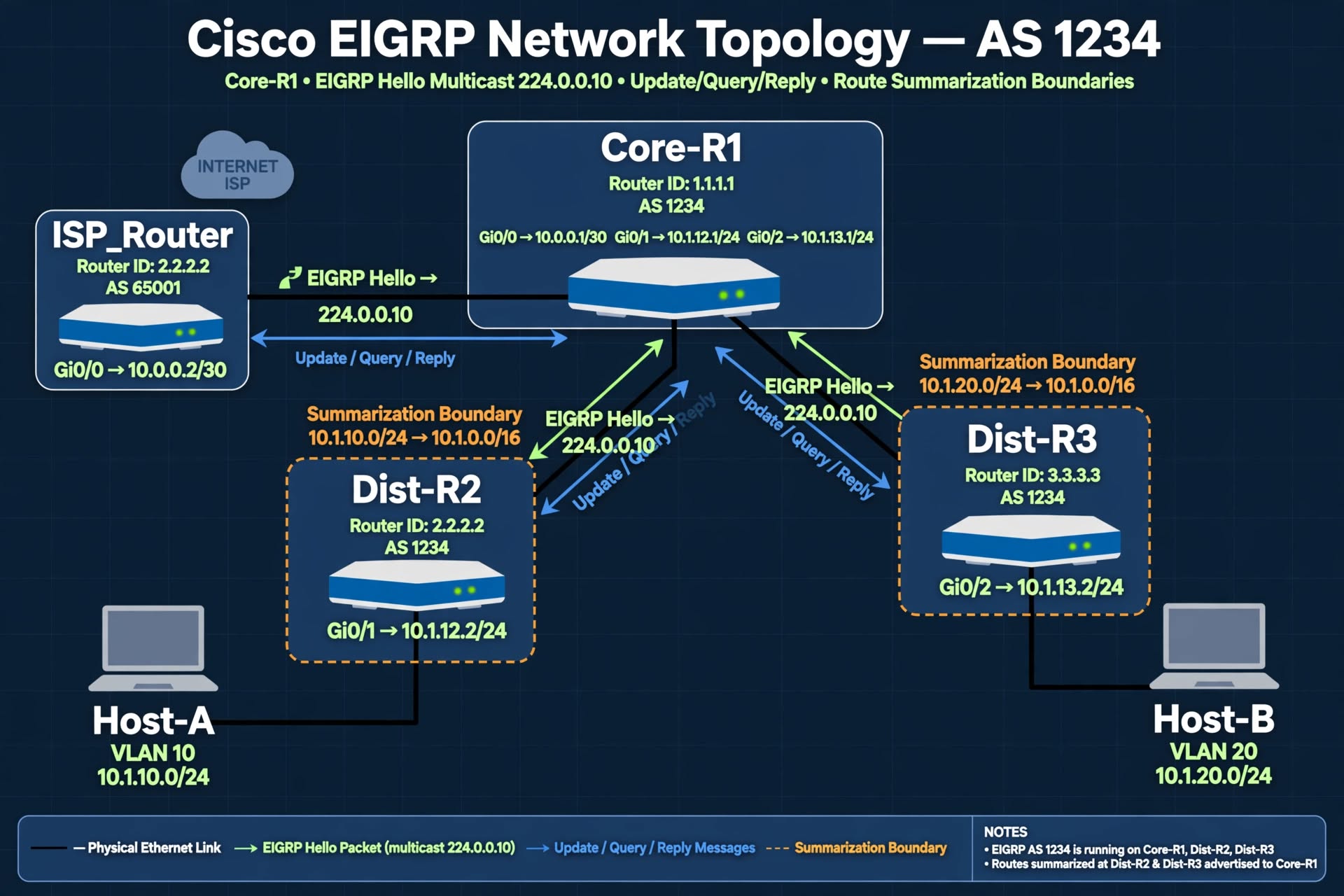
Figure 1 — EIGRP Module C Lab Topology (AS 1234) with dual-path design for load balancing and metric tuning labs.
Show ASCII Fallback (for terminal users)
+-------------------+
| ISP_Router |
| (Simulated WAN) |
+--------+----------+
| Gi0/0 (10.0.0.0/30)
|
+--------+----------+
| Core-R1 (AS 1234)|
| RID: 1.1.1.1 |
+----+--------+-----+
| |
Gi0/1 (10.1.12.0/24)| | Gi0/2 (10.1.13.0/24)
| |
+--------+--+ +--+--------+
| Dist-R2 | | Dist-R3 |
| RID: 2.2.2.2| | RID: 3.3.3.3|
+----+-------+ +----+------+
| |
(VLAN 10) (VLAN 20)
10.1.10.0/24 10.1.20.0/24
| |
+----+----+ +------+-----+
| Host-A | | Host-B |
| .10 | | .10 |
+---------+ +------------+
Pillar 2 — Device Inventory Table
| Device | Role | Interfaces | IP Addresses | EIGRP AS | Router ID |
|---|---|---|---|---|---|
| Core-R1 | Hub / Border | Gi0/0 (to ISP) Gi0/1 (to R2) Gi0/2 (to R3) Lo0 |
10.0.0.1/30 10.1.12.1/24 10.1.13.1/24 1.1.1.1/32 |
1234 | 1.1.1.1 |
| Dist-R2 | Distribution | Gi0/0 (to R1) Gi0/1 (to Host-A) Lo0 |
10.1.12.2/24 10.1.10.1/24 2.2.2.2/32 |
1234 | 2.2.2.2 |
| Dist-R3 | Distribution | Gi0/0 (to R1) Gi0/1 (to Host-B) Lo0 |
10.1.13.2/24 10.1.20.1/24 3.3.3.3/32 |
1234 | 3.3.3.3 |
| Host-A | End device | Eth0 | 10.1.10.10/24 (GW .1) | N/A | N/A |
| Host-B | End device | Eth0 | 10.1.20.10/24 (GW .1) | N/A | N/A |
| ISP_Router | Simulated WAN | Gi0/0 | 10.0.0.2/30 | 65001 | 9.9.9.9 |
Pillar 3 — Traffic Flow & Protocol Legend
| Symbol | Meaning |
|---|---|
| Green Arrows | EIGRP Hello packets (multicast 224.0.0.10) |
| Blue Arrows | EIGRP Update / Query / Reply messages |
| Orange Dashed | Summarization route boundaries |
| Black Lines | Physical Ethernet links |
| Purple Dashed | Static unicast neighborship (when applicable) |
| Red Dashed | Load-share path (equal or unequal cost) |
Lab Tasks (5 Progressive Scenarios)
Step-by-step configuration with verification checkpoints
1
Equal-Cost Load Balancing with Maximum-Paths
Objective: Configure EIGRP to install multiple equal-cost paths to a destination. Observe that both paths appear in the routing table and verify the default maximum-path behavior.
Why This Matters in Production: Equal-cost load balancing is the most common form of load balancing. Understanding how the maximum-path limit affects which paths get installed is essential for capacity planning.
Step 1 — Verify current state
Core-R1# show ip route 10.1.10.0
! Currently only one path installed (single successor)

Core-R1# show ip protocols | include Maximum path
! Verify default value (typically 4)
Step 2 — Make paths equal-cost
! Match the delay on both uplinks so metrics become identical
Core-R1# configure terminal
Core-R1(config)# interface GigabitEthernet0/2
Core-R1(config-if)# delay 10

! Now both Gi0/1 and Gi0/2 have identical delay = same metric
Step 3 — Verify both paths installed
Core-R1# show ip route 10.1.10.0
! Should now show both paths with identical metrics

Core-R1# show ip eigrp topology 10.1.10.0/24
! Should show "2 successors"
Expected Output
Core-R1# show ip route 10.1.10.0
Routing entry for 10.1.10.0/24
  Known via "eigrp 1234", distance 90, metric 158720, type internal
  Routing Descriptor Blocks:
  * 10.1.12.2, from 10.1.12.2, 00:15:23 ago, via GigabitEthernet0/1
      Route metric is 158720, traffic share count is 1
    10.1.13.2, from 10.1.13.2, 00:15:23 ago, via GigabitEthernet0/2
      Route metric is 158720, traffic share count is 1

! Both paths have equal metrics and share count 1:1
2
Unequal-Cost Load Balancing with Variance
Objective: Configure variance to enable unequal-cost load balancing. Observe how EIGRP installs paths with different metrics and calculates the share-count ratio.
Why This Matters in Production: Variance is EIGRP's unique feature — no other routing protocol supports unequal-cost load balancing natively. Understanding share count is critical for predicting how traffic will be distributed.
Step 1 — Restore unequal metrics
! Change delay to make paths have different metrics
Core-R1# configure terminal
Core-R1(config)# interface GigabitEthernet0/2
Core-R1(config-if)# delay 100

! Now Gi0/2 has a higher metric than Gi0/1
Step 2 — Verify Feasibility before enabling variance
Core-R1# show ip eigrp topology 10.1.10.0/24
! Confirm the backup path passes Feasibility (RD < FD)
! If it fails Feasibility, variance will NOT help
Step 3 — Enable variance
Core-R1(config)# router eigrp 1234
Core-R1(config-router)# variance 2
Core-R1(config-router)# exit

! Verify both paths install
Core-R1# show ip route 10.1.10.0
Expected Output
Core-R1# show ip route 10.1.10.0
Routing entry for 10.1.10.0/24
  Known via "eigrp 1234", distance 90, metric 158720, type internal
  Routing Descriptor Blocks:
  * 10.1.12.2, from 10.1.12.2, 00:15:23 ago, via GigabitEthernet0/1
      Route metric is 158720, traffic share count is 2
    10.1.13.2, from 10.1.13.2, 00:15:23 ago, via GigabitEthernet0/2
      Route metric is 307200, traffic share count is 1

! Both paths installed. Lower-metric path gets share count 2
! Traffic distribution: 2/3 via Gi0/1, 1/3 via Gi0/2
3
Offset-List Path Manipulation
Objective: Use an offset-list to selectively inflate the metric of a specific route on one interface. Observe the impact on path selection and verify that the offset does not break the Feasibility Condition.
Why This Matters in Production: Offset-lists are the most precise tool for path manipulation in EIGRP. But applied carelessly, they can silently break Feasible Successors, leaving the network vulnerable to extended outages.
Step 1 — Establish baseline
Core-R1# show ip eigrp topology 10.1.10.0/24
! Record: 1 successor, 1 feasible successor
! Note the FD (Feasible Distance)
Step 2 — Create ACL matching specific route
Core-R1# configure terminal
Core-R1(config)# ip access-list standard MATCH_HOSTA_SUBNET
Core-R1(config-std-nacl)# permit 10.1.10.0 0.0.0.255
Core-R1(config-std-nacl)# exit
Step 3 — Apply offset-list inbound
Core-R1(config)# router eigrp 1234
Core-R1(config-router)# offset-list MATCH_HOSTA_SUBNET in 5000 GigabitEthernet0/1
! Increases the local metric on Gi0/1 for 10.1.10.0/24 by 5000

! Verify the change
Core-R1# show ip eigrp topology 10.1.10.0/24
Step 4 — Verify FS is still valid
Core-R1# show ip eigrp topology all-links | include 10.1.10.0
! Confirm backup path still satisfies Feasibility
! If the metric change made RD > FD, FS is broken
Expected Output
Core-R1# show ip eigrp topology 10.1.10.0/24
P 10.1.10.0/24, 1 successors, FD is 163720
  via 10.1.12.2 (163720/156160), GigabitEthernet0/1
  via 10.1.13.2 (307200/156160), GigabitEthernet0/2

! Note: FD changed from 158720 to 163720 (+5000 offset)
! Backup path RD (156160) still less than new FD (163720)
! Feasibility Condition still passes
Step 5 — Cleanup (optional)
! Remove the offset-list to restore original state
Core-R1(config)# router eigrp 1234
Core-R1(config-router)# no offset-list MATCH_HOSTA_SUBNET in 5000 GigabitEthernet0/1
4
Share Count Tuning & Traffic Distribution
Objective: Configure multiple paths with different metrics and observe how share count determines proportional traffic distribution. Tune metrics to achieve a specific traffic ratio.
Why This Matters in Production: Sharing traffic between links with different capacities requires careful tuning. Understanding share count lets you predict exactly how packets will be distributed.
Step 1 — Verify current share counts
Core-R1# show ip route 10.1.10.0
! Look at each path's "traffic share count is N"

Core-R1# show ip eigrp topology 10.1.10.0/24
! Check FD and the metric of each successor
Step 2 — Target a specific ratio
! Goal: Force a 3:1 share ratio between Gi0/1 and Gi0/2
! Achieve by tuning delay on the backup path

Core-R1# configure terminal
Core-R1(config)# interface GigabitEthernet0/2
Core-R1(config-if)# delay 200

! Now the metrics should differ enough to produce 3:1
Step 3 — Verify the new share ratio
Core-R1# show ip route 10.1.10.0
! Expected: Gi0/1 share count = 3, Gi0/2 share count = 1

Core-R1# show ip eigrp topology 10.1.10.0/24
! Confirm both paths still show as successors
Expected Output
Core-R1# show ip route 10.1.10.0
Routing entry for 10.1.10.0/24
  Known via "eigrp 1234", distance 90, metric 158720, type internal
  Routing Descriptor Blocks:
  * 10.1.12.2, from 10.1.12.2, 00:15:23 ago, via GigabitEthernet0/1
      Route metric is 158720, traffic share count is 3
    10.1.13.2, from 10.1.13.2, 00:15:23 ago, via GigabitEthernet0/2
      Route metric is 383360, traffic share count is 1

! Ratio 3:1 achieved
! 75% of packets via Gi0/1, 25% via Gi0/2
Step 4 — Verify with live traffic
! From Host-A, generate continuous ping traffic to Host-B:
Host-A# ping 10.1.20.10 repeat 1000 size 1500

! On Core-R1, check interface counters:
Core-R1# show interfaces GigabitEthernet0/1 | include output packets
Core-R1# show interfaces GigabitEthernet0/2 | include output packets

! The packet counts should reflect the 3:1 ratio
5
Asymmetric Routing Diagnosis & Fix (Expert)
Objective: Diagnose and fix a production problem where variance is causing asymmetric routing. Applications on Host-A and Host-B intermittently fail because forward and return traffic use different paths with different latencies.
Why This Matters in Production: This is a real-world challenge. Variance across links with different physical latency breaks stateful firewalls and TCP timing. Diagnosing this requires understanding both EIGRP's behavior and the application's requirements.
Scenario Setup
Variance has been enabled to utilize both links. But now TCP sessions are failing intermittently. Your task is to:
- Verify that forward and return traffic are using different paths
- Determine the correct production fix
- Restore stable connectivity for stateful applications
Step 1 — Verify current state
Core-R1# show ip route 10.1.10.0
Core-R1# show ip route 10.1.20.0
! Look at how traffic is distributed for both directions

Core-R1# show ip protocols | include variance
! Confirm variance is enabled
Step 2 — Confirm the asymmetry
! Trace path from Core-R1 to Host-A and Host-B
Core-R1# traceroute 10.1.10.10
Core-R1# traceroute 10.1.20.10

! On Dist-R2 and Dist-R3, check return paths
Dist-R2# show ip route 10.1.20.10
Dist-R3# show ip route 10.1.10.10

! If forward path uses Gi0/1 but return uses Gi0/2, you have asymmetry
Step 3 — Choose the fix
! Option A: Remove variance entirely
Core-R1# configure terminal
Core-R1(config)# router eigrp 1234
Core-R1(config-router)# no variance
! Traffic returns to single primary path; backup becomes standby only

! Option B: Tune metrics to make paths equal-cost
Core-R1(config)# interface GigabitEthernet0/2
Core-R1(config-if)# delay 10
! Now both paths have equal metrics — load balancing is symmetric

! Option C: Restrict variance to specific routes via offset-lists
! (Most complex — advanced design consideration)

! Step 4: Verify symmetric behavior after the fix
Core-R1# show ip route 10.1.10.0
Core-R1# show ip route 10.1.20.0
! Forward and return should now use matching paths
Verification
! After Option B (equal-cost fix):

Core-R1# show ip route 10.1.10.0
Routing entry for 10.1.10.0/24
  Known via "eigrp 1234", distance 90, metric 158720, type internal
  Routing Descriptor Blocks:
  * 10.1.12.2, from 10.1.12.2, 00:15:23 ago, via GigabitEthernet0/1
      Route metric is 158720, traffic share count is 1
    10.1.13.2, from 10.1.13.2, 00:15:23 ago, via GigabitEthernet0/2
      Route metric is 158720, traffic share count is 1

! Equal-cost. Return path also equal-cost.
! No more asymmetric behavior.
! TCP sessions now stable.
The Production Lesson
Variance is a powerful tool, but it requires careful design consideration. Before enabling variance across links with different physical latency, verify that no stateful devices (firewalls, load balancers, VPN concentrators) sit in the path. In most modern enterprise networks, equal-cost load balancing with careful delay tuning is the safer choice.