Part 4 of 5 · Lab Guide
EIGRP Module B · Enterprise Routing Master Series
Hands-On Lab: DUAL Algorithm & Path Selection
Five progressive lab tasks with production-grade topology, step-by-step CLI solutions, and verification checkpoints. Import the included .unl files into EVE-NG and complete the tasks to master DUAL mechanics, feasible successor selection, query propagation, and SIA recovery.
Lab Topology (3-Pillar Standard)
Visual diagram, device inventory table, and traffic legend
How to Read This Topology
The topology is documented using the Pause4Tech 3-Pillar Standard: (1) Topology diagram for visual reference, (2) device inventory table for addressing, and (3) traffic legend explaining protocol flows.
Pillar 1 — Topology Diagram
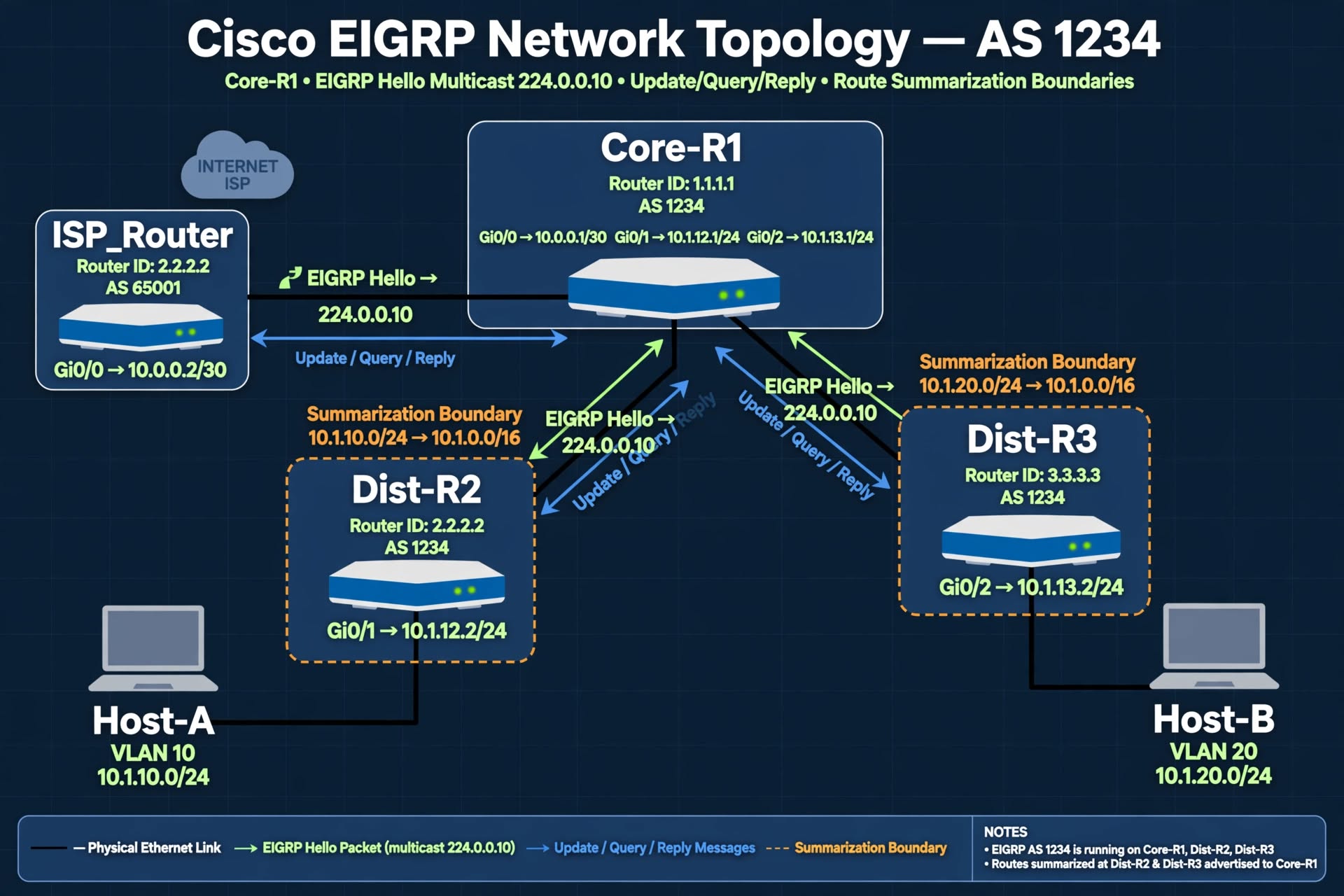
Figure 1 — EIGRP Module B Lab Topology (AS 1234) with DUAL path selection flows and query boundaries.
Show ASCII Fallback (for terminal users)
+-------------------+
| ISP_Router |
| (Simulated WAN) |
+--------+----------+
| Gi0/0 (10.0.0.0/30)
|
+--------+----------+
| Core-R1 (AS 1234)|
| RID: 1.1.1.1 |
+----+--------+-----+
| |
Gi0/1 (10.1.12.0/24)| | Gi0/2 (10.1.13.0/24)
| |
+--------+--+ +--+--------+
| Dist-R2 | | Dist-R3 |
| RID: 2.2.2.2| | RID: 3.3.3.3|
+----+-------+ +----+------+
| |
(VLAN 10) (VLAN 20)
10.1.10.0/24 10.1.20.0/24
| |
+----+----+ +------+-----+
| Host-A | | Host-B |
| .10 | | .10 |
+---------+ +------------+
Pillar 2 — Device Inventory Table
| Device | Role | Interfaces | IP Addresses | EIGRP AS | Router ID |
|---|---|---|---|---|---|
| Core-R1 | Hub / Border | Gi0/0 (to ISP) Gi0/1 (to R2) Gi0/2 (to R3) Lo0 |
10.0.0.1/30 10.1.12.1/24 10.1.13.1/24 1.1.1.1/32 |
1234 | 1.1.1.1 |
| Dist-R2 | Distribution | Gi0/0 (to R1) Gi0/1 (to Host-A) Lo0 |
10.1.12.2/24 10.1.10.1/24 2.2.2.2/32 |
1234 | 2.2.2.2 |
| Dist-R3 | Distribution | Gi0/0 (to R1) Gi0/1 (to Host-B) Lo0 |
10.1.13.2/24 10.1.20.1/24 3.3.3.3/32 |
1234 | 3.3.3.3 |
| Host-A | End device | Eth0 | 10.1.10.10/24 (GW .1) | N/A | N/A |
| Host-B | End device | Eth0 | 10.1.20.10/24 (GW .1) | N/A | N/A |
| ISP_Router | Simulated WAN | Gi0/0 | 10.0.0.2/30 | 65001 | 9.9.9.9 |
Pillar 3 — Traffic Flow & Protocol Legend
| Symbol | Meaning |
|---|---|
| Green Arrows | EIGRP Hello packets (multicast 224.0.0.10) |
| Blue Arrows | EIGRP Update / Query / Reply messages |
| Orange Dashed | Summarization route boundaries |
| Black Lines | Physical Ethernet links |
| Purple Dashed | Static unicast neighborship (when applicable) |
| Red Dashed | Query propagation path (for SIA analysis) |
Lab Tasks (5 Progressive Scenarios)
Step-by-step configuration with verification checkpoints
1
Successor & Feasible Successor Verification
Objective: Examine the DUAL topology table, identify successor and feasible successor paths for each destination, and interpret the Feasibility Condition.
Why This Matters in Production: Reading the DUAL topology table is a core skill. Without it, you cannot tell whether a route has instant failover protection or must undergo query-based reconvergence during an outage.
Step 1 — Verify EIGRP is running
Core-R1# show ip eigrp neighbors
! Verify both Dist-R2 and Dist-R3 are FULL neighbors

Core-R1# show ip route eigrp
! Verify EIGRP routes are installed
Step 2 — Inspect the DUAL topology table
Core-R1# show ip eigrp topology
! Examine each destination
! Look for: "P" (Passive) state
! Look for: "1 successors, FD is X"
! Look for: successor line and feasible successor line
Step 3 — Check all paths including those failing Feasibility
Core-R1# show ip eigrp topology all-links
! This shows ALL paths including alternates
! Compare which paths qualify as FS vs which fail the Feasibility Condition
Expected Output
Core-R1# show ip eigrp topology
P 10.1.10.0/24, 1 successors, FD is 158720
  via 10.1.12.2 (158720/156160), GigabitEthernet0/1
  via 10.1.13.2 (2300416/156160), GigabitEthernet0/2

P 10.1.20.0/24, 1 successors, FD is 158720
  via 10.1.13.2 (158720/156160), GigabitEthernet0/2
  via 10.1.12.2 (2300416/156160), GigabitEthernet0/1

! Both destinations have 1 successor + 1 feasible successor
! Feasibility: RD (156160) < FD (158720) -- condition passes
2
Feasibility Condition Under Scrutiny
Objective: Use an offset-list to inflate the metric of a backup path so that it fails the Feasibility Condition. Observe how the route loses its feasible successor and enters Active state during a link failure.
Why This Matters in Production: Offset-lists and metric manipulation can accidentally destroy feasible successors. Understanding this interaction prevents unintended query storms and SIA events.
Step 1 — Baseline: Record current FS status
Core-R1# show ip eigrp topology 10.1.10.0/24
! Note: 1 successor + 1 feasible successor

! Record the RD of the backup path
Step 2 — Apply offset-list to inflate backup path
Core-R1# configure terminal
Core-R1(config)# ip access-list standard MATCH_DEST
Core-R1(config-std-nacl)# permit 10.1.10.0 0.0.0.255
Core-R1(config-std-nacl)# exit

Core-R1(config)# router eigrp 1234
Core-R1(config-router)# offset-list MATCH_DEST in 200000 GigabitEthernet0/2
! This inflates the RD on Gi0/2 by 200000
Step 3 — Verify FS is gone
Core-R1# show ip eigrp topology 10.1.10.0/24
! Backup path now shows as ALTERNATE (fails Feasibility)

Core-R1# show ip eigrp topology all-links | include 10.1.10.0 -A 3
! Full path details with both metrics
Expected Output
Core-R1# show ip eigrp topology 10.1.10.0/24
P 10.1.10.0/24, 1 successors, FD is 158720
  via 10.1.12.2 (158720/156160), GigabitEthernet0/1
  via 10.1.13.2 (2358720/165312), GigabitEthernet0/2

! Compare RD (165312) to FD (158720)
! RD > FD -- Feasibility Condition FAILS
! Backup path is no longer a Feasible Successor
3
Query Propagation & Convergence Timing
Objective: Force a route into Active state by removing all feasible successors and shutting down the primary link. Trace query propagation using debug commands and measure convergence time.
Why This Matters in Production: When a route loses its successor and no FS exists, DUAL enters Active state and sends queries. Understanding how long this takes and where queries travel is essential for diagnosing production outages.
Step 1 — Enable event tracking
Core-R1# terminal monitor
Core-R1# debug eigrp packets query reply
Core-R1# debug eigrp fsm

! In another session, watch the topology table
Core-R1# show ip eigrp topology active
Step 2 — Remove feasible successor artificially
! Apply an aggressive offset-list to eliminate the FS
Core-R1# configure terminal
Core-R1(config)# router eigrp 1234
Core-R1(config-router)# offset-list MATCH_DEST in 500000 GigabitEthernet0/2
Step 3 — Force the route into Active state
! Shut down the primary path interface
Core-R1(config)# interface GigabitEthernet0/1
Core-R1(config-if)# shutdown

! Observe the console
! Watch for:
! 1. Route transitions from Passive to Active
! 2. Query sent to 224.0.0.10
! 3. Reply received from Dist-R3
! 4. Route transitions back to Passive
Step 4 — Verify convergence
Core-R1# show ip eigrp topology active
! Should be empty once convergence completes

Core-R1# show ip eigrp events
! Full event trace showing Active/Passive transitions
Expected Output
Core-R1# show ip eigrp topology active
! Empty output means all routes are Passive

Core-R1# show ip eigrp events | head -20
Event information for AS 1234:
1    19:42:14.988 Query origination: 10.1.10.0
2    19:42:14.855 Route Active: 10.1.10.0/24
3    19:42:15.123 Rcv reply from 10.1.13.2
4    19:42:15.267 Route Passive: 10.1.10.0/24
5    19:42:15.301 Route install: 10.1.10.0/24

! Convergence time: ~0.5 seconds
! Query sent, reply received, route reinstalled
4
SIA Event Recovery (3-Fault Scenario)
Objective: Recover from a complex production incident where three interacting DUAL faults have combined to cause a cascading SIA event. Diagnose each fault, fix them in the correct order, and restore stable convergence.
Why This Matters in Production: Real SIA events rarely have a single cause. This lab simulates three simultaneous faults — exactly what senior engineers face during a production incident call.
Intentional Faults (Do NOT read ahead if you want the challenge)
Click to reveal the misconfigurations (only after attempting yourself)
- Aggressive offset-list on Core-R1 Gi0/2 inflating metrics beyond FD (from Task 2)
- Passive interface on Dist-R3 Gi0/1 suppressing Host-B subnet advertisement
- Missing stub — neither router is configured as stub, so queries propagate freely
Step 1 — Diagnose the incident
Core-R1# show ip eigrp neighbors
Core-R1# show ip eigrp topology active
Core-R1# show ip eigrp events | include SIA|Active
Core-R1# show ip protocols | include Passive

Dist-R3# show ip protocols | include Passive
Dist-R3# show ip eigrp topology | include Active
Step 2 — Fix the offset-list fault
Core-R1# configure terminal
Core-R1(config)# router eigrp 1234
Core-R1(config-router)# no offset-list MATCH_DEST in 500000 GigabitEthernet0/2

! Verify FS returns
Core-R1# show ip eigrp topology 10.1.10.0/24
Step 3 — Fix the passive-interface fault
! On Dist-R3
Dist-R3# configure terminal
Dist-R3(config)# router eigrp 1234
Dist-R3(config-router)# no passive-interface GigabitEthernet0/1

! Verify Host-B subnet is advertised
Core-R1# show ip route 10.1.20.0
Step 4 — Apply stub routing to confine queries
! On both edge routers
Dist-R2# configure terminal
Dist-R2(config)# router eigrp 1234
Dist-R2(config-router)# eigrp stub connected summary

Dist-R3# configure terminal
Dist-R3(config)# router eigrp 1234
Dist-R3(config-router)# eigrp stub connected summary
Verification
Core-R1# show ip eigrp topology active
! Empty -- all routes Passive

Core-R1# show ip eigrp neighbors
! Both Dist-R2 and Dist-R3 in FULL state

Core-R1# show ip protocols | section Stub
! Confirms stub routing is active on neighbors

Core-R1# show ip eigrp events | include SIA
! No new SIA events since fix
5
Query Scope Optimization Challenge
Objective: A network has been experiencing recurring SIA events during peak traffic hours. Redesign the EIGRP topology to eliminate SIA risk by implementing stub routing, summarization, and metric tuning in combination.
Why This Matters in Production: This is a real CCIE-level scenario. You must analyze the existing design, identify why SIA is happening, and implement a resilient multi-layer solution — not just a single config change.
Scenario Setup
The current network has no stub routing or summarization. Any route failure causes queries to propagate across the entire topology. Under peak load, some queries time out and trigger SIA events.
Diagnostic Phase
Core-R1# show ip eigrp topology summary
Core-R1# show ip eigrp events | include Query|SIA | count
Core-R1# show ip protocols | section Stub
Core-R1# show ip route | include Null0

! Baseline: measure query count over 5 minutes
Solution Phase — Implement Query Confinement
! Step 1: Configure stub on edge routers
Dist-R2(config)# router eigrp 1234
Dist-R2(config-router)# eigrp stub connected summary

Dist-R3(config)# router eigrp 1234
Dist-R3(config-router)# eigrp stub connected summary

! Step 2: Configure summarization at boundary
Core-R1(config)# interface GigabitEthernet0/1
Core-R1(config-if)# ip summary-address eigrp 1234 10.1.0.0 255.255.0.0

Core-R1(config)# interface GigabitEthernet0/2
Core-R1(config-if)# ip summary-address eigrp 1234 10.1.0.0 255.255.0.0

! Step 3: Tune metrics for optimal path selection
Core-R1(config)# interface GigabitEthernet0/1
Core-R1(config-if)# delay 10

Core-R1(config)# interface GigabitEthernet0/2
Core-R1(config-if)# delay 20
Verification
! Confirm stub routing
Core-R1# show ip protocols | section Stub

! Confirm summary routes and Null0 installation
Core-R1# show ip route | include Null0
! Should show: 10.1.0.0/16 is a summary, Null0

! Confirm no query propagation to stubs
Core-R1# show ip eigrp events | include Query
! Fewer queries than baseline

! Confirm no SIA events
Core-R1# show log | include SIA
! Should be empty

! Confirm route stability
Core-R1# show ip route eigrp
! All expected routes present, no flapping
The Production Takeaway
This challenge demonstrates the exact techniques used in production EIGRP design: stub at the edge, summarize at the boundary, tune metrics where needed. Every one of these three mechanisms exists specifically to prevent the SIA events you just eliminated.