🧪 Part 4 of 5 · Lab Guide
EIGRP Module A · Enterprise Routing Master Series
Hands-On Lab: EIGRP Fundamentals, RTP & Adjacency
Four progressive lab tasks with production-grade topology, step-by-step CLI solutions, and verification checkpoints. Import the included .unl file into EVE-NG and complete the tasks to master EIGRP neighbor formation, static vs dynamic peering, timer tuning, and failure simulation.
📐 Lab Topology (3-Pillar Standard)
Visual diagram, device inventory table, and traffic legend
📌 How to Read This Topology
The topology is documented using the Pause4Tech 3-Pillar Standard: (1) Topology diagram for visual reference, (2) device inventory table for addressing, and (3) traffic legend explaining protocol flows.
🔷 Pillar 1 — Topology Diagram
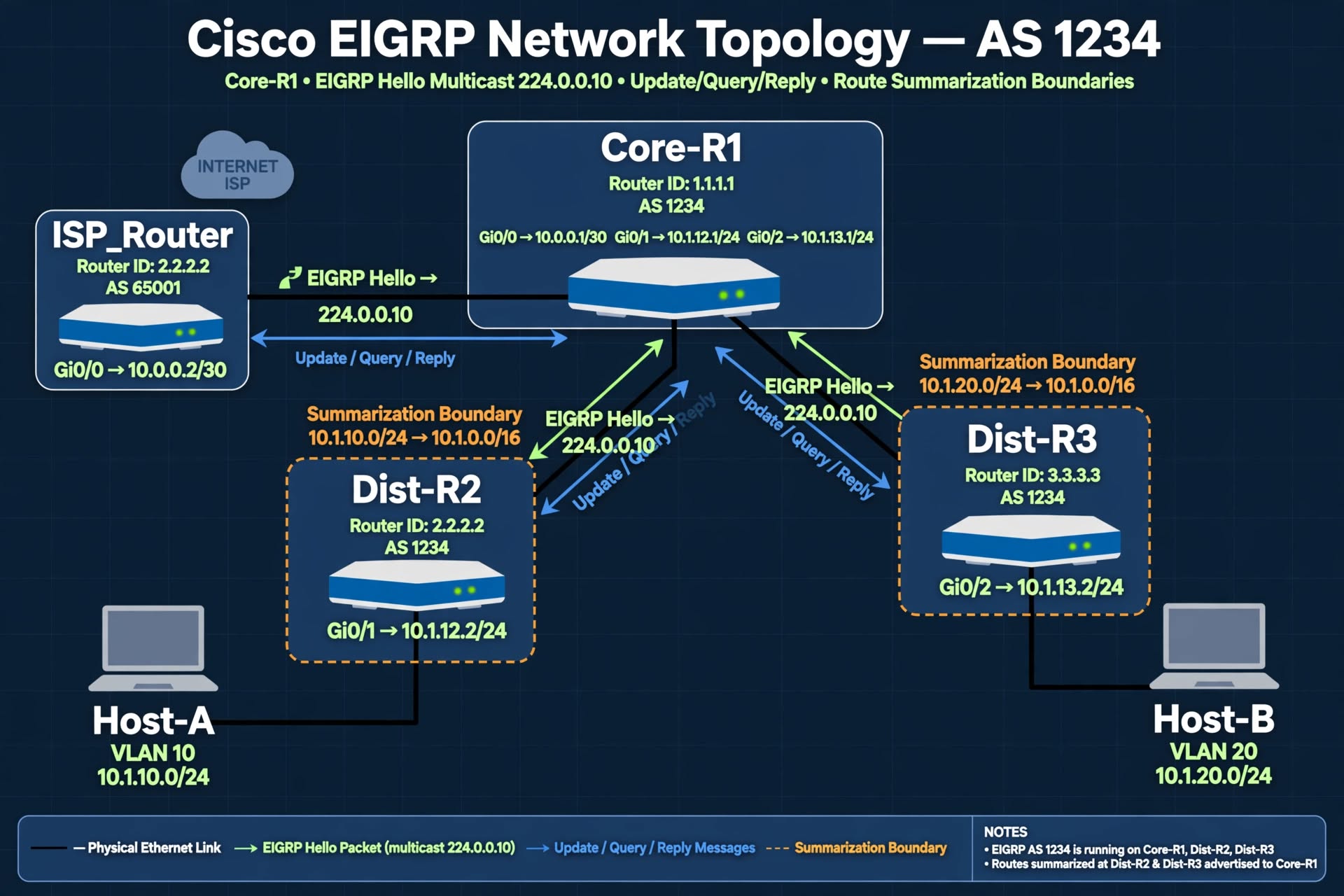
Figure 1 — EIGRP Module A Lab Topology (AS 1234) with EIGRP Hello, Update/Query/Reply flows and summarization boundaries.
📐 Show ASCII Fallback (for terminal users)
+-------------------+
| ISP_Router |
| (Simulated WAN) |
+--------+----------+
| Gi0/0 (10.0.0.0/30)
|
+--------+----------+
| Core-R1 (AS 1234)|
| RID: 1.1.1.1 |
+----+--------+-----+
| |
Gi0/1 (10.1.12.0/24)| | Gi0/2 (10.1.13.0/24)
| |
+--------+--+ +--+--------+
| Dist-R2 | | Dist-R3 |
| RID: 2.2.2.2| | RID: 3.3.3.3|
+----+-------+ +----+------+
| |
(VLAN 10) (VLAN 20)
10.1.10.0/24 10.1.20.0/24
| |
+----+----+ +------+-----+
| Host-A | | Host-B |
| .10 | | .10 |
+---------+ +------------+
🔷 Pillar 2 — Device Inventory Table
| Device | Role | Interfaces | IP Addresses | EIGRP AS | Router ID |
|---|---|---|---|---|---|
| Core-R1 | Hub / Border | Gi0/0 (to ISP) Gi0/1 (to R2) Gi0/2 (to R3) Lo0 |
10.0.0.1/30 10.1.12.1/24 10.1.13.1/24 1.1.1.1/32 |
1234 | 1.1.1.1 |
| Dist-R2 | Distribution | Gi0/0 (to R1) Gi0/1 (to Host-A) Lo0 |
10.1.12.2/24 10.1.10.1/24 2.2.2.2/32 |
1234 | 2.2.2.2 |
| Dist-R3 | Distribution | Gi0/0 (to R1) Gi0/1 (to Host-B) Lo0 |
10.1.13.2/24 10.1.20.1/24 3.3.3.3/32 |
1234 | 3.3.3.3 |
| Host-A | End device | Eth0 | 10.1.10.10/24 (GW .1) | N/A | N/A |
| Host-B | End device | Eth0 | 10.1.20.10/24 (GW .1) | N/A | N/A |
| ISP_Router | Simulated WAN | Gi0/0 | 10.0.0.2/30 | 65001 | 9.9.9.9 |
🔷 Pillar 3 — Traffic Flow & Protocol Legend
| Symbol | Meaning |
|---|---|
| 🟢 Green Arrows | EIGRP Hello packets (multicast 224.0.0.10) |
| 🔵 Blue Arrows | EIGRP Update / Query / Reply messages |
| 🟠 Orange Dashed | Summarization route boundaries |
| ⚫ Black Lines | Physical Ethernet links |
| 🟣 Purple Dashed | Static unicast neighborship (when applicable) |
🧪 Lab Tasks (4 Progressive Scenarios)
Step-by-step configuration with verification checkpoints
1
Basic EIGRP Configuration & Neighbor Verification
Objective: Enable EIGRP AS 1234 on all routers, form adjacencies, and verify routes for loopbacks and connected subnets appear in the routing table.
Why This Matters in Production: Correct neighbor formation is the foundation of any dynamic routing deployment. Misconfigured AS numbers, passive interfaces, or missing network statements cause complete loss of routing.
📝 Solution — Core-R1
router eigrp 1234
 network 10.0.0.0 0.255.255.255
 network 10.1.12.0 0.0.0.255
 network 10.1.13.0 0.0.0.255
 network 1.1.1.1 0.0.0.0
 no auto-summary
📝 Solution — Dist-R2
router eigrp 1234
 network 10.1.12.0 0.0.0.255
 network 10.1.10.0 0.0.0.255
 network 2.2.2.2 0.0.0.0
 no auto-summary
📝 Solution — Dist-R3
router eigrp 1234
 network 10.1.13.0 0.0.0.255
 network 10.1.20.0 0.0.0.255
 network 3.3.3.3 0.0.0.0
 no auto-summary
✅ Verification
Core-R1# show ip eigrp neighbors
H   Address         Interface  Hold  Uptime   SRTT   RTO  Q  Seq
0   10.1.12.2       Gi0/1       13    00:10:23  12     200   0  45
1   10.1.13.2       Gi0/2       11    00:09:15  8      200   0  32

Core-R1# show ip route eigrp
D    2.2.2.2/32     [90/158720] via 10.1.12.2, 00:10:23, Gi0/1
D    3.3.3.3/32     [90/158720] via 10.1.13.2, 00:09:15, Gi0/2
D    10.1.10.0/24  [90/158720] via 10.1.12.2, 00:10:23, Gi0/1
D    10.1.20.0/24  [90/158720] via 10.1.13.2, 00:09:15, Gi0/2
2
Static vs Dynamic Neighborship Configuration
Objective: Configure static unicast neighborship between Core-R1 and Dist-R2, while maintaining dynamic multicast neighborship with Dist-R3. Verify both adjacency types coexist correctly.
Why This Matters in Production: Static unicast neighborship is used in security-conscious environments or when multicast traffic is restricted. Understanding how to deploy it without breaking dynamic adjacencies is a common enterprise requirement.
📝 Solution — Core-R1 (Static for R2, Dynamic for R3)
router eigrp 1234
 neighbor 10.1.12.2 GigabitEthernet0/1
📝 Solution — Dist-R2 (Static for R1)
router eigrp 1234
 neighbor 10.1.12.1 GigabitEthernet0/0
📝 Solution — Dist-R3 (No Change — Dynamic)
! No additional configuration required.
! Dist-R3 continues to use multicast 224.0.0.10 for discovery.
✅ Verification
Core-R1# show ip eigrp neighbors
H   Address         Interface  Hold  Uptime   SRTT   RTO  Q  Seq
0   10.1.12.2       Gi0/1       12    00:05:23  10     200   0  12   ← Static (unicast)
1   10.1.13.2       Gi0/2       14    00:05:15  8      200   0  10   ← Dynamic (multicast)

! Confirm traffic counters increase differently per neighbor type
Core-R1# show ip eigrp traffic
3
RTP Timer Tuning & Failure Simulation
Objective: Modify EIGRP hello and hold timers on one interface, observe neighbor behavior when timers mismatch, then correct the mismatch to re-establish adjacency.
Why This Matters in Production: Timers can be tuned to accelerate convergence on high-speed links or accommodate congested WAN environments. Understanding the mismatch symptoms is critical for on-call troubleshooting.
📝 Step 1 — Modify Timers on Core-R1 Gi0/1
interface GigabitEthernet0/1
 ip hello-interval eigrp 1234 3
 ip hold-time eigrp 1234 9
📝 Step 2 — Observe Debug on Dist-R2 (Keep Default 5/15)
Dist-R2# debug eigrp packets hello
! Wait 30 seconds — you will see asymmetric timing

! Sample output shows Core-R1 sending Hellos every 3s while
! Dist-R2's default hold timer of 15s may cause early expiry.
📝 Step 3 — Align Timers on Dist-R2
interface GigabitEthernet0/0
 ip hello-interval eigrp 1234 3
 ip hold-time eigrp 1234 9
📝 Step 4 — Restore Default Timers (Cleanup)
! On both Core-R1 Gi0/1 and Dist-R2 Gi0/0
interface GigabitEthernet0/1
 no ip hello-interval eigrp 1234
 no ip hold-time eigrp 1234
✅ Verification
Core-R1# show ip eigrp neighbors
H   Address         Interface  Hold  Uptime   SRTT   RTO  Q  Seq
0   10.1.12.2       Gi0/1       12    00:00:35  10     200   0  6

Core-R1# show ip eigrp interfaces detail GigabitEthernet0/1
  Hello-interval is 5, Hold-time is 15
4
Neighbor Failure Simulation & Recovery
Objective: Simulate a neighbor failure by shutting down an interface, observe the neighbor flap and route removal, then restore the interface and verify full convergence.
Why This Matters in Production: Understanding how EIGRP reacts to interface failures is essential for predicting failover behavior and validating network resilience. This lab simulates the exact symptoms you'll see in production during a link failure.
📝 Step 1 — Baseline: Verify Current State
Core-R1# show ip eigrp neighbors
! Record the current neighbor count and route entries

Core-R1# show ip route eigrp
! Note the routes learned via Dist-R2
📝 Step 2 — Simulate Failure: Shut Down Gi0/1 on Core-R1
Core-R1# configure terminal
Core-R1(config)# interface GigabitEthernet0/1
Core-R1(config-if)# shutdown
📝 Step 3 — Observe Neighbor Loss & Route Removal
! Watch syslog messages appear:
%DUAL-5-NBRCHANGE: EIGRP-IPv4 1234: Neighbor 10.1.12.2
  (GigabitEthernet0/1) is down: interface down

Core-R1# show ip eigrp neighbors
! Dist-R2 (10.1.12.2) should no longer appear

Core-R1# show ip route eigrp
Core-R1# show ip route eigrp
! Routes via Dist-R2 should be removed from the table

Core-R1# show ip eigrp topology | include 10.1.10.0
! Route should be in Active state OR removed entirely
📝 Step 4 — Restore the Interface
Core-R1# configure terminal
Core-R1(config)# interface GigabitEthernet0/1
Core-R1(config-if)# no shutdown
📝 Step 5 — Verify Full Recovery
! Watch syslog for neighbor coming back:
%DUAL-5-NBRCHANGE: EIGRP-IPv4 1234: Neighbor 10.1.12.2
  (GigabitEthernet0/1) is up: new adjacency
✅ Verification
Core-R1# show ip eigrp neighbors
H   Address         Interface  Hold  Uptime   SRTT   RTO  Q  Seq
0   10.1.12.2       Gi0/1       12    00:00:15  10     200   0  3   ← Restored
1   10.1.13.2       Gi0/2       14    00:15:32  8      200   0  88

Core-R1# show ip route eigrp
D    2.2.2.2/32     [90/158720] via 10.1.12.2, 00:00:15, Gi0/1  ← Restored
D    10.1.10.0/24  [90/158720] via 10.1.12.2, 00:00:15, Gi0/1  ← Restored
💡 Production Insight
Notice how EIGRP immediately queried neighbors when the interface went down. If a Feasible Successor existed, failover would be instant. Since only Core-R1 had a path, the route entered Active state and was removed. This is why Feasible Successors matter — they enable instant failover without query propagation.
5
Challenge Scenario — Multi-Issue Troubleshooting
Objective: A real-world scenario where multiple EIGRP issues are introduced simultaneously. Your job is to identify and fix ALL of them without being told what's wrong.
Why This Matters in Production: Real networks rarely have single, isolated problems. This challenge tests your ability to diagnose multiple interacting issues — exactly what senior engineers face during production outages.
📝 Scenario Setup
A junior engineer made "small tweaks" to fix a performance issue. Now EIGRP adjacency is flapping between Core-R1 and Dist-R2, and routes are incomplete. Your job: identify every misconfiguration and restore full operation.
📝 Intentional Misconfigurations (Do NOT look ahead if you want the challenge)
🔒 Click to reveal the misconfigurations (only after attempting yourself)
- Mismatched hello timers — Core-R1 Gi0/1 set to 3s hello / 9s hold, Dist-R2 still at default 5s / 15s
- K-value mismatch — Dist-R2 changed to
metric weights 0 1 1 1 1 1 - Duplicate router ID — Dist-R2 set its RID to 1.1.1.1 (same as Core-R1)
- Wrong AS number — Dist-R3 changed its EIGRP AS to 4321
📝 Diagnostic Commands
Core-R1# show ip eigrp neighbors
Core-R1# show ip eigrp interfaces detail GigabitEthernet0/1
Core-R1# show ip protocols | include K-values|Router ID|AS
Core-R1# show log | include EIGRP|DUAL
Core-R1# debug eigrp packets
✅ Expected Fixes
! Fix 1: Align timers on both sides
Core-R1(config)# interface GigabitEthernet0/1
Core-R1(config-if)# ip hello-interval eigrp 1234 5
Core-R1(config-if)# ip hold-time eigrp 1234 15

! Fix 2 & 3: Restore default K-values and unique RID on Dist-R2
Dist-R2(config)# router eigrp 1234
Dist-R2(config-router)# metric weights 0 1 0 1 0 0
Dist-R2(config-router)# eigrp router-id 2.2.2.2

! Fix 4: Restore correct AS on Dist-R3
Dist-R3(config)# no router eigrp 4321
Dist-R3(config)# router eigrp 1234
Dist-R3(config-router)# network 10.1.13.0 0.0.0.255
Dist-R3(config-router)# network 10.1.20.0 0.0.0.255
Dist-R3(config-router)# network 3.3.3.3 0.0.0.0
Dist-R3(config-router)# no auto-summary

! Final verification
Core-R1# show ip eigrp neighbors
! All neighbors should show FULL state
Core-R1# show ip route eigrp
! All expected routes should be present
💡 The Real-World Lesson
This challenge simulates a real production event: multiple interacting faults that cascade. Senior engineers don't just fix one problem — they trace the pattern across the network. Note how each misconfiguration produced different syslog messages, giving you clues to work with.
📦 Download Lab Packages (.unl Files)
Five progressive .unl topologies — from basic to expert challenge
📌 How to Use These Files
Each lab has its own .unl file with the exact topology and starting configuration. Download the file for the lab you're working on, import it into EVE-NG, and follow the lab tasks. New to lab setup? Read the Lab Setup Master Guide first.
1
Basic Lab
EIGRP_A_Lab1_Basic.unl
⭐ Basic · ~15 min
2
Static Neighbor
EIGRP_A_Lab2_StaticNeighbor.unl
⭐⭐ Basic+ · ~20 min
3
Timers & RTP
EIGRP_A_Lab3_Timers.unl
⭐⭐⭐ Intermediate · ~25 min
4
Failure Recovery
EIGRP_A_Lab4_Scenario.unl
⭐⭐⭐⭐ Advanced · ~20 min
5
Expert Challenge
EIGRP_A_Lab5_Challenge.unl
⭐⭐⭐⭐⭐ Expert · ~30 min
⏳ Downloads Coming Soon
The .unl files are being prepared for hosting on Cloudflare R2. Download links will be activated shortly. In the meantime, you can manually build the topology using the device inventory table above.